We built our own Claude Design
We built it on OAP, open-source building blocks for running AI agents on your own infra and with the models you choose. The agent never decides what it's allowed to do; OAP does.
Claude Design is Anthropic's tool for designing in conversation: describe a page, Claude builds it in your brand, and you refine it by commenting on the design. messagingbot is our version.
Transcript
Claude Design, rebuilt from OAP parts. messagingbot turns a brief into an on-brand page, and takes feedback pinned right onto the design.
Like a good designer, messagingbot scopes the brief before it draws anything: who it's for, the one message, and what the button should do.
Jordan answers, and points it at the brand repos. Those are the only repositories this install lets it read.
It posts a plan, loads its design skill, and reads the real colour tokens and approved copy, through a GitHub tool that can only read from approved repos.
The design comes back as an artifact: versioned, stored durably, and rendered inert, so its HTML can't run a single script.
View live opens it in OAP's artifact viewer: the rendered page, its revision history, and a live link back to the session.
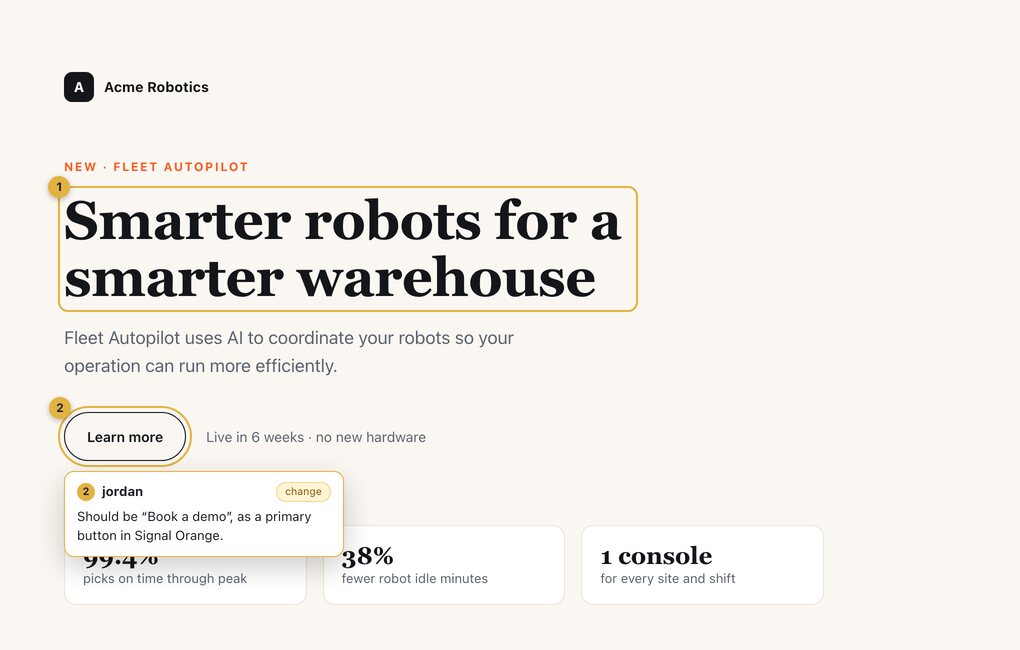
Now the Claude Design move. Jordan clicks the headline and pins a note to it: it's off-message.
And another on the button: wrong words, and the wrong colour.
Both notes go back as one structured batch. The server checks that Jordan may view this exact artifact before the agent sees a word of it.
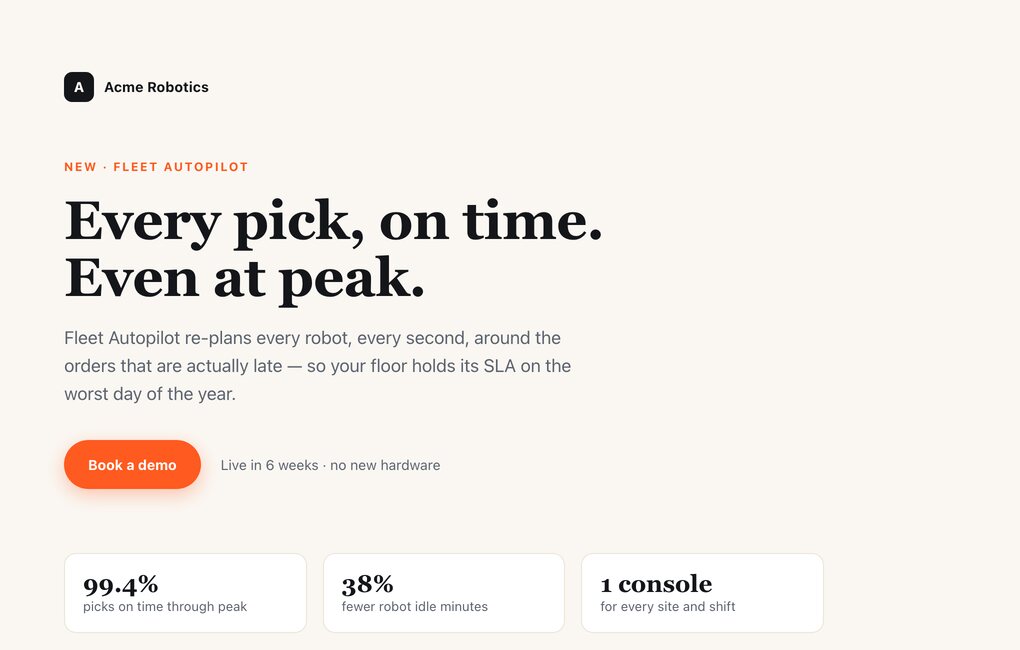
messagingbot revises the same artifact. Revision 2 fixes both notes and says so in its change note, and revision 1 is still there, byte for byte.
No new platform feature made this possible. It's an agent definition, a read-only tool, two skills, and the artifact viewer OAP already ships.
What we built
messagingbot, an agent that takes a marketing brief and builds an HTML page from your real design tokens and approved copy. Reviewers pin notes on the page and it revises from them.
What it's made of
Five pieces of configuration: a prompt, a read-only GitHub tool, two design skills, OAP's canvas with comments, and three install questions.
What we didn't build
The canvas, the comment system, the renderer, the sandbox and the permission checks. Those are OAP; messagingbot is configuration on top.
What it can't do
Slip your unreleased roadmap into public copy. It reads only the brand sources you approve; a request for anything else is refused, whatever the prompt says.
See the refusalWhat is Claude Design?
Claude Design is Anthropic's visual design tool. It launched in April 2026 as an Anthropic Labs research preview, and has since been folded into ordinary Claude conversations. You describe what you want in chat, and Claude produces it on a canvas beside the conversation.
Brand setup
During setup it builds a design system from your codebase and design files, and every project after that uses your colours, type, and components.
Comments on the design
You click an element on the page and leave a comment on it, and Claude works from that comment.
Versions and handoff
Each round of feedback produces a new version, and a finished design can be handed off to Claude Code.
That is close to what our marketing team asked for: a designer that already knows the brand and can take notes on a draft.
What you need to build one
What a design agent needs, and the OAP primitive that already provides it.
Everything in the right column shipped with OAP before messagingbot existed.
The five pieces of messagingbot
messagingbot adds no new platform code. It is a small bundle that tells OAP how this agent should behave, what it may touch, and what to ask whoever installs it. Each piece below sits next to the configuration that sets it up.
A prompt that scopes the brief first
Before it designs anything, messagingbot asks for the audience, the key message, the format, the call to action, and which repositories hold the brand. It then posts a plan and waits for answers.
Without those answers the page tends to come out generic, so the prompt makes asking them the first step.
From manifests/agentclass.yaml
Read the brief and decide what's missing. A good marketing piece needs, at minimum: the audience, the goal/outcome, the medium/format, the single key message, and the call-to-action. If any are unclear, ask 2-4 sharp clarifying questions ... BEFORE designing.

Never invent a colour, font, or claim that isn't grounded in what you read.
The brand, read-only
messagingbot reads the brand with one tool, the GitHub CLI. A toolspec around it decides which calls go through: read requests only, and only on the repositories whoever installed the agent approved, such as the ones holding your design tokens and messaging.
Anything else is refused before it reaches GitHub, and the agent is told why. The check runs outside the model, so no prompt can talk its way past it.
- acme/designread
- acme/messagingread
- acme/roadmaprefused before it reaches GitHub
This repository is not one messagingbot may read (spec.config.readableRepos, set by the operator at install). Ask the user which approved repository holds what you need.
The message is the toolspec's own, from manifests/toolspec.yaml.
Design skills the installer picks
Brand tokens cover colour and type. For layout and visual judgment the agent uses skills, instructions it loads when they're relevant. The bundle includes two from Anthropic's public skills repository, pinned to a commit: frontend-design for visual direction, and theme-factory, which offers ten preset palettes for teams without a brand system.
Whoever installs it picks which ones the agent gets, and a misspelled name fails the install instead of quietly leaving a skill out.
- name: skills
  type: resourceList
  prompt: "Which design skills should messagingbot load?"
  enum: [frontend-design, theme-factory]
  default: [frontend-design, theme-factory]
  binding:
    - target:
        "AgentClass/messagingbot#spec.skills[?]"
Canvas and comments
Two settings give messagingbot its canvas. The first lets it render HTML pages, revise them, and share a live view. The second lets a reviewer in that live view pin notes to parts of the page and send them back.
Together they cover the versions, preview and click-to-comment this workflow uses from Claude Design's canvas.
capabilities:
  artifacts:
    renderers: [html]              # the canvas
  session_views:
    interactions: [annotation_batch]  # the comments
Customize it
You make messagingbot yours at install, by answering three questions: a GitHub token, the repositories that hold your brand, and which skills to load. Give it a read-only token; the bundle README covers scoping it.
$ oap agent lint    examples/messagingbot
$ oap agent install examples/messagingbot --namespace default
$ oap channel create --kind slack   # bind it to messagingbot
What happens when you pin a note
In the demo, Jordan (on a fictional marketing team) leaves two notes on revision 1, and messagingbot answers both in revision 2. Switch to revision 2 to see the result.
Annotations
Generic. Lead with our peak-season pillar, the outcome, not the AI.
Should be "Book a demo", as a primary button in Signal Orange.
Each note is pinned to the element it's about. Send delivers both together, and OAP first checks that Jordan may view this design and take part in the session.
Change note
"Every pick, on time. Even at peak."
"Book a demo", primary button
Same artifact, new revision. Revision 1 is still in the history, unchanged.
Why it was easy on OAP
We chose OAP because a design agent your whole team uses needs more than a canvas. Everything below comes with the platform, so we described the agent and switched it on.
Guardrails outside the model
The repository gate, inert rendering and the check on every reviewer are OAP's, not code in the bundle, and no prompt can switch them off. See the refusal.
A record you can verify
Revisions can't be changed after the fact, and each session's transcript is a signed audit log you can verify offline: what the agent read, and who asked for what.
Runs in your cluster
The agent, its designs and its logs live on infrastructure you run. The model is whichever provider your cluster is configured with: Anthropic, OpenAI or OpenRouter.
Where your team already talks
The same agent answers in a Slack thread or OAP's browser chat, and the conversation stays linked to the design it produced.
Swappable parts
Skills and brand repositories are chosen at install and the model is a cluster setting, so the same bundle works for another brand by pointing it at different repos.
Multiplayer, with the owner's say-so
A colleague in the thread asks to join, the session's owner approves, and then they can chat with messagingbot and pin notes too. Multiplayer works out of the box.
Where Claude Design is still ahead
Claude Design does more today: direct editing on the canvas, slides and prototypes, export to tools like Canva, and handoff to Claude Code. Most of these could be added to messagingbot with parts OAP already has; our marketing team just hasn't needed them yet.
messagingbot is open source, so if you need one first, contributions are welcome.
Artifact renderers are pluggable, so slides or prototypes would be a new renderer, which is new code.
Connect the tool's API as an MCP server and give the agent a tool to publish with.
OAP agents can delegate to other agents, so a finished design can go to a coding agent like codebot, which opens the pull request.
A skill could read your codebase and draft a tokens file as an artifact for someone to review and commit, so the agent never needs write access.
Frequently asked questions
Can I build a Claude Design alternative on OAP?
Yes. messagingbot reproduces the core Claude Design workflow on OAP: a brief in chat, a design grounded in your brand system, click-to-comment feedback on the rendered page, and versioned revisions. It is built from an agent definition, a read-only GitHub tool, two agent skills, and OAP's artifact system, with no new platform code.
Do I have to write code to run it?
No. messagingbot ships as an example agent bundle in the OAP repository. Install it with oap agent install examples/messagingbot, answer three questions (a GitHub token, your brand repositories, and which skills to load), and bind it to a Slack channel or use the browser chat.
Where does messagingbot get our brand from?
From the GitHub repositories you name at install, such as one holding colour and type tokens and one holding approved messaging. It reads them through the gh CLI, and its toolspec refuses writes and any repository that is not on the approved list.
Is it safe to open HTML a model wrote?
Yes. OAP renders every artifact inert: you see the page, but no script in it runs. messagingbot is also instructed to produce HTML and CSS only.
Which model does it use?
Whichever default model your OAP cluster is configured with. The bundle pins no model, so it works with any provider OAP supports, including Anthropic, OpenAI, and OpenRouter.
Can I add our own brand-voice skill?
Yes. Add a SkillSource for the repository that holds the skill, add an entry to the AgentClass spec.skills list, and add its name to the skills install question. The installer can then select it like the bundled skills.
.oap format.The demo on this page is a scripted simulation of Slack and the artifact viewer; its company, people, and repositories are fictional. The configuration shown is the real bundle.
Try messagingbot with your brand
Two steps: get OAP running, then install the bundle. Its install questions are where you point it at your own design and messaging repos.
Install OAP
One command brings it up on a laptop or a Mac. The guide lists what you need first.
Install OAPInstall messagingbot
# from a clone of the repo$ oap agent install examples/messagingbot --namespace default$ oap channel create --kind slackThe repository allowlist blocks from the first call. OAP's per-person permission checks start by logging what they would deny, and block once you switch them to enforcing.
View the bundle on GitHub